KODAK S3060 Scanner
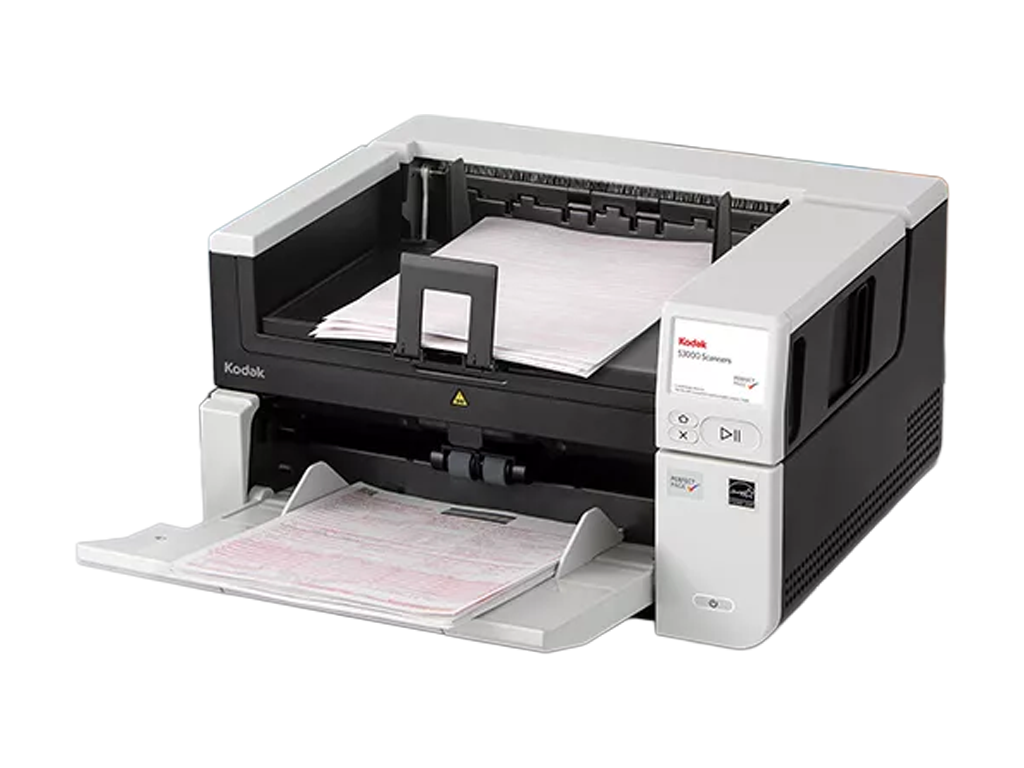
The KODAK S3060 Scanner is a versatile A3 document scanner built for speed, precision, and reliability in demanding office environments. Compact yet powerful, it handles a wide variety of media—from standard office documents to delicate or oversized materials—with remarkable accuracy. Its intelligent paper handling and automated feed tray adjustments allow for smooth, consistent operation even in high-volume scanning tasks.
With onboard image processing, Perfect Page technology, and advanced document protection, the S3060 delivers superior image quality while reducing the load on your computer. A large colour touchscreen and Smart Touch functionality streamline workflows, allowing users to scan directly to email, cloud storage, or business applications with ease.
Micrographic Engineering Services is an authorised dealer of KODAK Alaris scanners in Australia.
KODAK S3060 Scanner
Key Features

On-Board Image Processing
Reduces reliance on your PC by performing image enhancements directly within the scanner, improving productivity and speed.

Versatile A3 Scanning Capability
Handles a wide range of media, including thick paper, fragile documents, folded pages, and oversized items with precision and care.

Advanced Paper Handling System
Auto-adjusting 300-sheet feed tray, double-feed detection, and intelligent document protection ensure smooth, jam-free operation for large batches.

Perfect Page Technology
Dual-light illumination and text enhancement deliver crisp, shadow-free, FADGI-compliant images ideal for digital archiving and OCR accuracy.

Smart Touch & Intuitive Interface
Customisable workflows and one-touch scanning simplify repetitive processes, helping users quickly scan, save, and share documents.
Network & Security Ready
Includes Gigabit Ethernet for shared access, secure boot technology, encryption for network data, and PIN-protected user workflows.
What’s Included
- KODAK S3060 A3 Document Scanner
- Power Supply and USB Cable
- Smart Touch and Capture Pro Limited Edition Software
- Feeder Consumables Kit
- User Guide and Setup Documentation
Why Choose the KODAK S3060 Scanner
- Engineered for high-volume A3 scanning with exceptional image quality
- Advanced document protection prevents jams and damage to originals
- Seamlessly integrates with existing business applications
- Compact, reliable, and environmentally certified (EPEAT® Gold, ENERGY STAR®)
- Backed by local support and expertise from Micrographic Engineering Services
Specifications
- Scanning Technology: Single RGB LED illumination CIS (CMOS) with 24-bit colour and 8-bit greyscale output; up to 1200 dpi image resolution.
- Throughput Speed: Up to 20 ppm / 40 ipm (black & white and greyscale at 200 dpi, AC-powered); up to 8 ppm / 16 ipm when USB-powered.
- Feeder Capacity: Holds up to 20 sheets of 80 g/m² (20 lb) paper.
- Connectivity: USB 2.0 interface; compatible with USB 3.2 Gen 1x1 for faster transfer speeds.
- Document Size & Weight: Scans media from 80 × 52 mm to 216 × 1524 mm; supports paper weights from 30–398 g/m² and hard cards up to 1.2 mm thick.
- Image & File Output: Outputs BMP, JPEG, PNG, TIFF (single or multipage), PDF, text-searchable PDF, RTF, and Microsoft Word/Excel formats.
- Perfect Page Image Processing: Includes autocrop, deskew, blank page removal, dual-stream scanning, halftone removal, sharpening, and automatic brightness/contrast.
- Operating Systems: Compatible with Windows 10/11 (32/64-bit), Linux (Ubuntu, SUSE, Neokylin), and macOS; ISIS, TWAIN, WIA, and KOFAX-certified drivers included.
- Power & Environment: 100–240 V, 50/60 Hz; ENERGY STAR Qualified and EPEAT Silver; operating temperature 10–35°C, humidity 10–85% RH.
- Dimensions & Weight: Height 78 mm, width 289 mm, depth 107 mm (with tray closed); weight 1.3 kg.
Request a Quote for KODAK S3060 Scanner
Order or Enquire Today
Get high-speed, high-precision scanning performance with the KODAK S3060 Scanner.
Order online now, or contact Micrographic Engineering Services for expert advice on the best scanner for your needs.